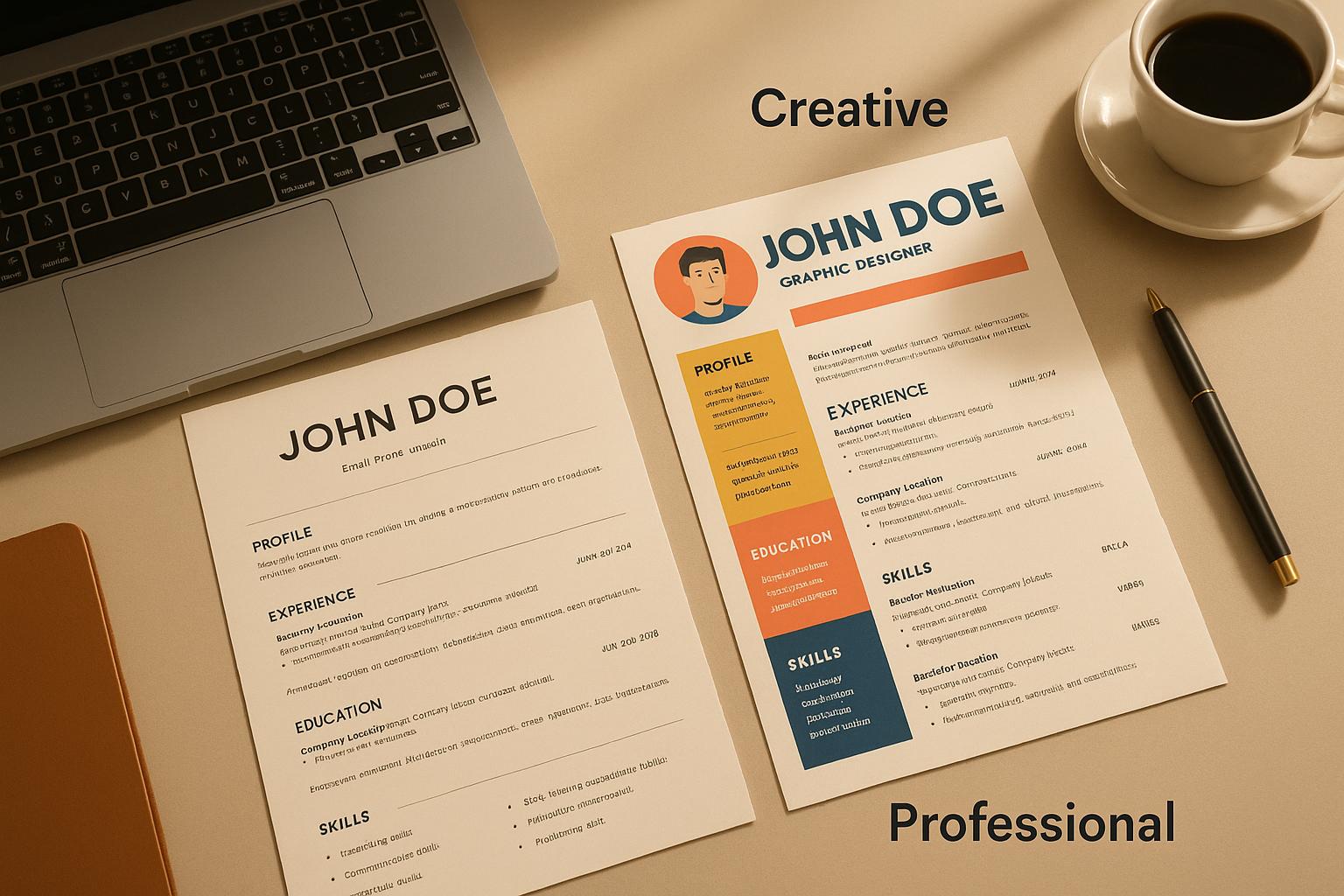
Professional vs Creative Resume Formats Compared
When choosing a resume format, your decision should align with your career goals, industry norms, and the role you’re applying for. Here’s a quick breakdown:
- Professional Resumes: Clean, structured, and ATS-friendly. Ideal for industries like finance, law, healthcare, or government where clarity and formality are prioritized.
- Creative Resumes: Bold, visually engaging, and personalized. Best suited for fields like design, marketing, or media where showcasing originality is key.
Key Differences
- Professional Resumes: Focus on simplicity and compatibility with automated systems (ATS). Use standard fonts, minimal colors, and logical layouts.
- Creative Resumes: Emphasize individuality and design skills with graphics, unique layouts, and interactive elements but may face ATS challenges.
Choosing the right format matters because ATS systems often filter resumes before they reach recruiters. Complex designs can hinder ATS processing, while overly simple formats might fail to impress in creative roles. A hybrid approach - combining structure with subtle design elements - can help balance both needs.
Quick Comparison
| Factor | Professional Resume | Creative Resume |
|---|---|---|
| Design | Simple, clean, standard fonts | Graphics, bold layouts, colors |
| ATS Compatibility | High | Low to moderate |
| Industry Fit | Finance, law, healthcare | Design, marketing, media |
| Ease of Updates | Easy | Time-consuming |
| First Impression | Professional and organized | Memorable and personalized |
Tip: For creative roles, maintain two versions - one ATS-friendly and one visually engaging. Tools like ScoutApply.com can help optimize resumes for both human and software reviewers.
TRADITIONAL VS MODERN RESUME 🤔 l How To Choose The Best Resume Format For Your Position & Industry
Professional Resume Format
Professional resume formats are a staple in more traditional hiring settings, where clarity and structure are key. These resumes focus on presenting work history and qualifications in a straightforward, easy-to-read manner.
Professional Resume Features
A professional resume is all about clean, organized layouts that lead the reader effortlessly through the content. They typically use standard fonts like Arial, Calibri, or Times New Roman in sizes ranging from 10 to 12 points. Colors are minimal - usually black text on a white background, with subtle gray accents for dividers. Margins are kept uniform, ranging between 0.5 to 1 inch, to ensure a polished and balanced appearance.
Key sections like "Experience", "Education", and "Skills" are placed exactly where hiring managers expect to find them. Information is arranged in reverse-chronological order, starting with the most recent role and working backward. This format highlights career growth while maintaining a logical flow. Strategic use of white space and consistent bullet points keeps everything clear and easy to scan.
Professional resumes avoid unnecessary design elements like decorative graphics or custom icons, ensuring that the focus remains on qualifications and experience.
Pros and Cons
The professional resume format offers several clear advantages in corporate environments:
- ATS compatibility: With up to 75% of resumes filtered out by applicant tracking systems (ATS) before a recruiter even sees them, the standardized structure of a professional resume ensures that your information is properly parsed and categorized.
- Familiarity: Recruiters can quickly locate key details without needing to navigate unconventional layouts.
- Professional alignment: This format signals that a candidate understands traditional workplace norms, which is particularly valued in conservative industries.
But there are trade-offs. For one, the format allows for limited personal expression, leaving little room to showcase creativity or individuality. If you're in a competitive field, this can make it harder to stand out among a sea of similar resumes. Additionally, the lack of visual impact may be a drawback for roles that emphasize design or creative skills, where a more eye-catching resume might better reflect your abilities.
When to Use Professional Resumes
Professional resumes are best suited for industries where formality and structure are non-negotiable. These include fields like finance, law, healthcare, government, and traditional engineering.
Take the finance sector, for example. Whether you're applying to an investment bank, accounting firm, or insurance company, a conventional resume format is expected - it reflects the industry's preference for professionalism and precision. Similarly, in the legal field, where tradition and precedent hold sway, a professional resume is practically mandatory.
Healthcare roles, especially clinical ones, also favor this format. Precision and adherence to established guidelines are critical in these settings, and a professional resume underscores those qualities. Government positions, whether at the federal, state, or local level, often come with strict formatting requirements detailed in job postings, making a professional resume the safest choice.
Lastly, engineering and technical roles within established companies typically lean toward professional resumes. These industries prioritize technical skills and clear qualifications over creative flair. While some tech startups might appreciate more inventive designs, most traditional engineering roles benefit from a straightforward, no-frills approach.
Next, we’ll take a closer look at creative resume formats and how they differ in both design and purpose.
Creative Resume Format
Creative resumes step away from traditional layouts, offering candidates a chance to highlight their personality and design skills in unique ways. These formats turn the resume itself into a showcase of creativity and technical expertise.
Creative Resume Features
These resumes stand out by using bold visual elements rarely seen in traditional formats. Custom color schemes often reflect personal branding or align with industry aesthetics. Typography is carefully selected for both style and readability, blending eye-catching header fonts with clean, easy-to-read body text.
Infographic elements are a popular feature, transforming standard statistics into engaging visuals. Skills might be represented with progress bars, pie charts, or custom icons, while timelines can illustrate career progression with creative pathways or milestone markers instead of plain bullet points.
Layout experimentation is another defining characteristic. Multi-column designs create magazine-like layouts, with sidebars for extra details. Some resumes incorporate geometric shapes, custom icons, or subtle background patterns that enhance the design without overpowering the content.
For digital versions, interactive elements like embedded videos or portfolio links add another layer of engagement. These features not only showcase technical skills but also make the resume more dynamic and memorable.
While these design choices can be impressive, they also come with specific challenges.
Pros and Cons
Creative resumes offer a mix of benefits and potential drawbacks:
On the plus side, they allow candidates in design-focused fields to demonstrate their skills immediately. The resume itself becomes a portfolio piece, showing off technical abilities and aesthetic sensibility. This can leave a lasting impression, helping applicants stand out in competitive markets.
Another advantage is that creative resumes strengthen personal branding. The visual design choices communicate personality, work style, and even cultural fit with potential employers.
However, there are challenges. ATS compatibility is a major issue - many applicant tracking systems struggle to read non-standard layouts, which means qualified candidates risk being filtered out before their resumes reach a human recruiter. Readability can also suffer if design elements overshadow the content, making it harder for hiring managers to quickly find key information.
Additionally, creative resumes might not be well-received in conservative industries or by traditional hiring managers. In these cases, they could be seen as unprofessional or overly flashy.
| Advantages | Disadvantages |
|---|---|
| Highlights design and technical skills | Poor compatibility with ATS systems |
| Leaves a memorable impression | Can be harder to read or scan |
| Strengthens personal branding | May seem unprofessional in traditional industries |
| Demonstrates creativity and innovation | Risks distracting from qualifications and experience |
When to Use Creative Resumes
Creative resumes work best in industries where visual communication and innovation are integral to the role. For example:
- Advertising agencies like Wieden+Kennedy or Ogilvy often expect candidates to showcase their creativity in every aspect, including their resumes.
- Graphic design studios and marketing departments see creative resumes as extensions of a candidate's portfolio.
- Media and entertainment companies, particularly in digital content creation, gaming, or streaming, value candidates who think outside the box.
- Startups and tech companies with design-focused cultures often welcome resumes that align with their innovative brand identities.
- Fashion and lifestyle brands prioritize aesthetic sensibility, making creative resumes a natural fit.
- Architecture firms, especially those with contemporary or experimental focuses, appreciate resumes that reflect spatial awareness and design thinking.
The key is to match the level of creativity with the company culture and the role. For instance, a UX designer applying to a fintech startup might use subtle creative elements to show design thinking while maintaining a professional tone. On the other hand, a motion graphics artist applying to a video production company could take a more elaborate approach, using animation and visual storytelling to make their resume stand out.
Ultimately, understanding the company's expectations and visual identity helps determine how much creativity to incorporate into the resume.
ATS Compatibility and AI Optimization
Applicant tracking systems (ATS) play a critical role in how resumes are processed, often determining whether your application gets seen by a human. Knowing how these systems interact with different resume formats is key to increasing your chances of moving past the initial screening.
How ATS Systems Handle Different Formats
Professional resumes tend to work well with ATS because of their clean layouts, standard fonts, and familiar section headers. Sections like "Work Experience", "Education", and "Skills" are easily recognized and organized by these systems. Using a linear structure with standard bullet points ensures that your qualifications are accurately captured.
On the other hand, creative resumes can run into trouble. Elements like multiple columns, custom graphics, text boxes, and unique fonts often confuse ATS software, leading to misinterpreted or missing information. While features like infographic timelines or progress bars might impress human reviewers, they rarely translate well through text-focused ATS algorithms.
AI-powered tools are now stepping in to bridge the gap, helping job seekers create resumes that are both visually appealing and ATS-compliant.
AI Tools for ATS Optimization
AI-driven platforms have revolutionized how resumes are optimized, making it easier to strike a balance between creativity and compatibility. A great example is ScoutApply.com, which uses AI to tackle challenges in both professional and creative resume designs.
The platform offers templates that combine eye-catching designs with ATS-friendly structures tailored to specific job descriptions. For those in creative fields, this means you can still use visually engaging elements without sacrificing ATS readability.
With guided editing tools, the system provides real-time feedback on formatting issues. If your layout is too complex or your section headers are non-standard, the AI suggests changes that keep your resume clear for ATS while maintaining your intended style.
Another standout feature is compliance checking, which simulates how an ATS processes your resume. This lets you identify and fix potential issues before submitting your application, ensuring your resume appears as intended to both machines and people.
ScoutApply.com also helps with keyword optimization by analyzing job descriptions to find important terms. It suggests where to place these keywords in your resume to boost ATS scores without making the content feel forced or unnatural.
ATS-Friendly Resume Tips
To complement AI tools, keep these practical tips in mind when creating an ATS-compatible resume that also appeals to human reviewers:
- Choose the right file format: PDFs are great for preserving formatting but can cause problems with older ATS systems. Microsoft Word (.docx) files are more universally compatible but less suited for complex designs.
- Stick to standard fonts: Fonts like Arial, Calibri, and Times New Roman are easy for ATS software to process. While decorative fonts might look appealing, they can lead to parsing errors.
- Use standard section headers: Stick with headers like "Professional Experience" rather than creative titles to help ATS software correctly categorize your information.
- Incorporate keywords naturally: Instead of keyword stuffing, integrate relevant terms and skills into your job descriptions for a more seamless fit with ATS algorithms.
- Maintain two versions: Have one visually appealing version for direct submissions and another ATS-optimized version for online applications. This way, you're covered for any scenario.
- Test your resume: Use ATS simulation tools or paste your resume into a plain text editor to see how well it translates. This simple step can reveal formatting issues and ensure all critical information is intact.
sbb-itb-e409340
How to Choose the Right Resume Format
Your choice of resume format should reflect your industry, role, and the expectations of potential employers. Striking the right balance between appealing to human reviewers and meeting the demands of Applicant Tracking Systems (ATS) is key. Let’s break down how different industries and roles influence this decision.
Format Selection by Industry and Role
In more traditional fields like finance, law, healthcare, and government, a professional and straightforward resume format is often the best choice. These industries value precision and organization, so a clean, chronological layout with standard headers ensures your information is easy to follow and aligns with established norms.
On the other hand, creative industries - such as advertising, graphic design, marketing, entertainment, and digital media - often encourage resumes with a bit more flair. For example, a graphic designer might use a visually compelling format to highlight their design skills, while a marketing manager might focus on showcasing measurable achievements and strategic thinking in a dynamic layout.
Tech roles often require a middle ground. While clarity and technical focus are essential, a touch of creativity can make your resume stand out. The type of company also matters: startups may appreciate bold and innovative designs, while larger corporations typically prefer more traditional formats that integrate seamlessly with structured hiring processes. This flexibility allows for combining approaches, as discussed below.
Combining Professional and Creative Elements
Once you’ve identified the norms for your industry, consider blending professional structure with creative touches. For instance, you can use modern fonts, subtle color accents, and simple dividers to make your resume visually appealing without sacrificing ATS compatibility. Thoughtful use of white space and a clear layout ensures your resume is easy to read for both hiring managers and automated systems.
It’s also smart to maintain multiple versions of your resume. For conservative industries, a traditional format works best, while creative roles may call for a more visually engaging version. Tailoring your resume to fit each opportunity can significantly boost your chances of making the right impression.
ScoutApply.com's Resume Formatting Tools
ScoutApply.com offers AI-powered tools to simplify the process of selecting the ideal resume format for your job search. With guided editing features and a variety of templates tailored to different industries, the platform helps you align your resume with employer expectations and ATS requirements.
The system analyzes your job description and industry standards to recommend whether you should stick to a traditional format, incorporate creative elements, or combine both. Plus, ScoutApply.com allows you to manage multiple resume versions in one account, making it easy to adapt your format for different applications.
All templates on ScoutApply.com are ATS-friendly, ensuring your resume is parsed correctly while maintaining a polished look. Real-time analytics further help you refine your resume for the best possible results.
Professional vs Creative Resume Comparison
Professional and creative resumes cater to different career paths and objectives, each excelling in distinct scenarios.
Side-by-Side Format Comparison
Here’s a breakdown of how these two resume types differ:
| Factor | Professional Resume | Creative Resume |
|---|---|---|
| Design Elements | Simple layout with clean lines, standard fonts like Arial or Calibri, and minimal graphics | Bold layouts featuring unique fonts, vibrant color schemes, and visual elements like infographics |
| ATS Compatibility | Works seamlessly with Applicant Tracking Systems due to its straightforward structure | May face issues with ATS due to complex designs and non-standard formatting |
| Reading Time | Designed for quick scans by recruiters | Takes longer to read because of added visual elements |
| Printing Quality | Clear and consistent in black-and-white printing | May lose impact if printed without color |
| Customization Effort | Easy to update and modify | Requires more time to adjust due to intricate design elements |
| Industry Acceptance | Commonly accepted in traditional industries like finance, law, and government | Favored in creative fields such as graphic design, marketing, and startups |
| Cost to Create | Affordable with free or low-cost templates widely available | May involve expenses for professional design software or services |
| Revision Flexibility | Quick to edit without disrupting the layout | Design-heavy formats can make revisions more time-consuming |
| Mobile Viewing | Optimized for readability on all devices | Complex designs might not display consistently on mobile screens |
These distinctions highlight how each resume format is tailored to specific industry needs and job functions.
Professional resumes are a staple in traditional fields like law, finance, and government, where clarity and simplicity are paramount. On the other hand, creative resumes double as a portfolio, showcasing artistic skills - perfect for roles in marketing, graphic design, or creative direction. However, their intricate designs can sometimes be a hurdle for automated screening systems.
One notable advantage of professional resumes is their ease of updating, making them practical for frequent revisions. Creative resumes, while visually impressive, require more upfront effort to design and are less flexible for edits. This trade-off reflects the choice between efficiency for digital screening and the opportunity to make a bold visual statement.
Resume preferences often depend on industry norms and regional expectations. With the growing reliance on AI-driven screening tools, many employers lean toward formats optimized for digital processing. Even for creative roles, maintaining a professional version for initial screenings is a smart move, with portfolios serving as a platform to display design expertise.
For a balanced approach, consider blending elements of both styles. A clean, professional format with subtle creative touches can strike the right chord - ensuring ATS compatibility while hinting at your artistic flair.
Conclusion
Main Takeaways
Choosing the right resume format depends on your industry, the role you're pursuing, and your career objectives. For traditional fields like finance, law, or government, professional resumes are the go-to option. These formats prioritize clean layouts and compatibility with applicant tracking systems (ATS), making them ideal for structured environments. On the other hand, creative resumes shine in artistic industries such as graphic design, marketing, and advertising. They can even double as a portfolio, showcasing your design skills in a visually compelling way.
That said, even for creative professionals, having an ATS-friendly version of your resume is a smart move. A hybrid approach - combining a clean structure with subtle creative elements - can help you navigate digital screenings while still making a memorable impression. This strategy is particularly useful for roles that value both innovation and professionalism.
Your Next Steps
Now that you understand the importance of tailoring your resume, it’s time to take action. Start by assessing the norms of your target industry and the specific demands of the roles you're applying for. For traditional organizations or government positions, stick to a professional format. For creative jobs, prepare two versions: one optimized for ATS and another that’s visually engaging.
To strike the perfect balance between clarity and creativity, consider using ScoutApply.com’s AI-powered tools. Your resume format plays a key role in your job search - choose carefully to ensure your qualifications leave a lasting impression.
FAQs
How can I make sure my creative resume works with ATS systems?
When crafting a creative resume that works well with ATS (Applicant Tracking System) software, simplicity is key. Stick to a clean design without tables, columns, or graphics, as these can confuse the system. Instead, use clear headings and straightforward formatting to ensure your resume is easy to read.
Make sure to include keywords from the job description. These terms help your resume align with what the system is scanning for. Stick to standard fonts and save your file in formats like .docx or .pdf, as these are easily processed by ATS. By keeping your layout simple and focusing on machine-readable elements, you can make your resume both eye-catching and ATS-compatible.
How can I effectively combine professional and creative elements in my resume?
To find the right mix of professionalism and creativity in your resume, try using a hybrid format. This style lets you showcase your skills and achievements while keeping the layout neat and easy to follow. Adding small design touches - like subtle colors, clean fonts, or simple icons - can make your resume visually appealing without sacrificing readability.
Be sure your design matches the expectations of the industry and role you're targeting. For instance, jobs in marketing or design might welcome a bit more creativity, while fields like finance or law typically prefer a more traditional look. Above all, focus on clarity and ensure your resume is ATS-friendly. Avoid complex layouts or images that might confuse automated systems scanning your resume.
When should I keep both a professional and a creative version of my resume?
If you’re applying to jobs across different industries, it’s smart to have two versions of your resume: one professional and one creative. A professional resume is ideal for fields like finance, law, or healthcare, where a more formal tone is expected. On the other hand, a creative resume can stand out in industries like design, marketing, or entertainment, where originality and flair are often valued.
By maintaining both, you can adapt your application to fit the specific role and industry. Whether you’re submitting through an online portal or connecting directly with a hiring manager, this approach allows you to showcase your skills in the way that best aligns with the job’s expectations, increasing your chances of securing an interview.